Developer Guide
Table of Contents
- Information About this Developer Guide
- Acknowledgements
- Setting Up, Getting Started
- Design
- Implementation
- Guides
- Appendix
Information about this Developer Guide
Purpose
This developer guide aims to provide information regarding design and implementation of Academy Directory. To do this effectively, the following details can be found:
- Design considerations of certain features
- Implementation details of certain features
- Possible future extensions
Target Audience
The current version of Academy Directory is specifically designed for CS1101S Avengers. Therefore, the main Target Audience of this developer guide are Java developers who are or formerly were CS1101S Avengers. As such, the following assumptions are made regarding the Target Audience:
- Is familiar with the common terms relating to Computer Science
- Is familiar with CS1101S module structure and teaching pedagogy
Technical background is assumed. We also provide the definitions for certain technical terms commonly used in this developer guide here.
Acknowledgements
- This project is based on the AddressBook-Level3 project created by the SE-EDU initiative.
- The formatting and content of the User Guide and Developer Guide is referenced from AY2122S1-CS2103T-w17-1/tp.
- Design of the internal version control system is heavily inspired by Git.
- Certain code implementations may have been inspired by Baeldung tutorials or StackOverflow answers.
- Application logo were designed with the assistance of Tailor Brand and Adobe Spark.
- Libraries used:
- JavaFX for the amazing GUI
- Jackson to save your data
- JUnit5 so that we can deliver to you bug-free!
- MDFX so that you can see User Guide in help without internet
- JFreeChart for powerful graphing and visualization APIs
- Background and icons used:
- Source Academy classroom front page, taken from the Asset page in Source Academy front-end License for reuse and distribution here
- Slides Carnival background here
- External icons used on the UI
- Student icon taken from IconS8
- Grade icon taken from PNGTree
- Statistic icon taken from PNGTree
Setting Up, Getting Started
Refer to the guide Setting up and getting started.
Design
Architecture
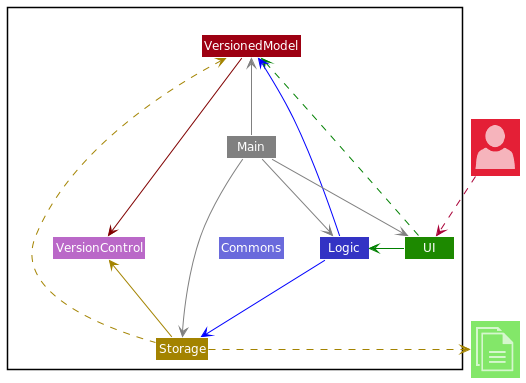
The Architecture Diagram given above explains the high-level design of the App.
Given below is a quick overview of main components and how they interact with each other.
Main components of the architecture
Main has two classes called Main and MainApp. It is responsible for,
- At app launch: Initializes the components in the correct sequence, and connects them up with each other.
- At shut down: Shuts down the components and invokes cleanup methods where necessary.
Commons represents a collection of classes used by multiple other components.
The rest of the App consists of four main components.
-
UI: The UI of the App. -
Logic: The command executor. -
VersionedModel: Holds the data of the App in memory. -
Storage: Reads data from, and writes data to, the hard disk.
On top of the above four main components, there is also an additional VersionControl which
provides common API for VersionedModel and Storage to implement version control. Because of this, the VersionControl component is usually left out in the diagrams in this
developer guide. For more information regarding the VersionControl component, read here.
How the architecture components interact with each other
The Sequence Diagram below shows how the components interact with each other for the scenario where the user issues the command delete 1.
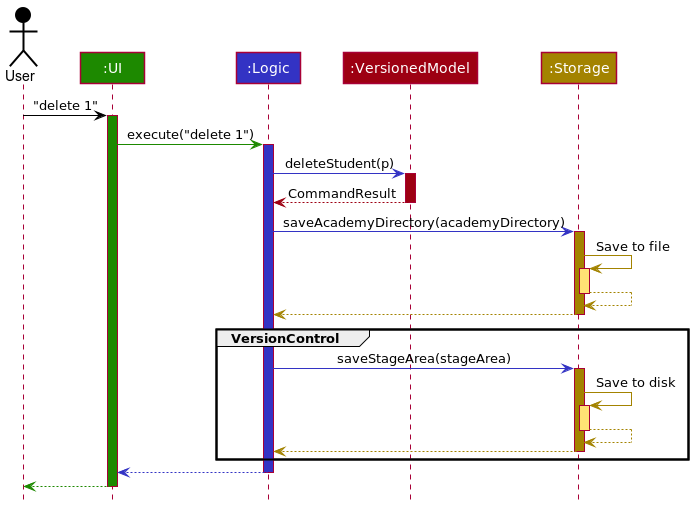
The part labeled “VersionControl” occurs because delete is a version controlled command. For non-version controlled
commands the sequence diagram stays largely the same; the difference is the lack of the “VersionControl” part.
For a list of version controlled command, refer here.
Each of the four main components (also shown in the diagram above),
- defines its API in an
interfacewith the same name as the Component. - implements its functionality using a concrete
{Component Name}Managerclass (which follows the corresponding APIinterfacementioned in the previous point).
For example, the Logic component defines its API in the Logic.java interface and implements its functionality using the LogicManager.java class which follows the Logic interface. Other components interact with a given component through its interface rather than the concrete class (reason: to prevent outside component’s being coupled to the implementation of a component), as illustrated in the (partial) class diagram below.
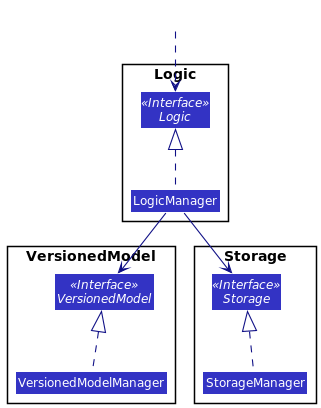
The sections below give more details of each component.
UI component
The API of this component is specified in Ui.java
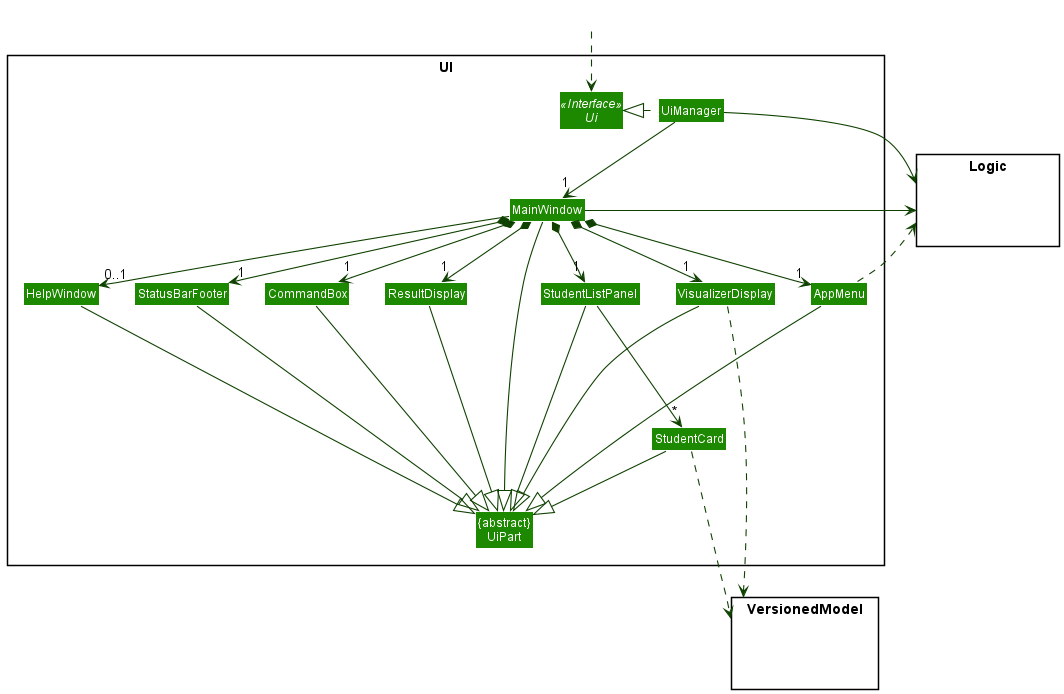
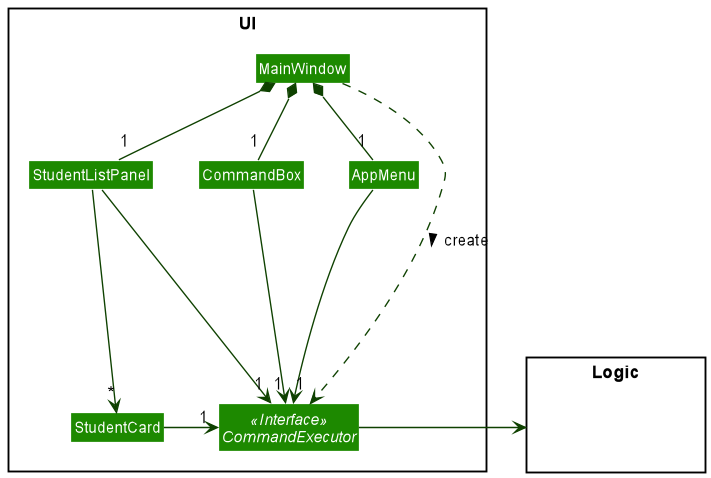
The UI consists of a MainWindow that is made up of parts smaller UI-part components, including CommandBox, ResultDisplay,
VisualizerDisplay, StudentListPanel, StatusBarFooter etc. All these, including the MainWindow, inherit from the abstract
UiPart class which captures the commonalities between classes that represent smaller parts of the visible GUI. Of these, all components are always presented,
except for the Help Window which can be shown or hidden depending on the results of user command.
The UI component uses the JavaFx UI framework. The layout of these UI parts are defined in their respective matching .fxml files stored in the src/main/resources/view folder. For example, the layout of the
MainWindow is
specified in MainWindow.fxml
The UI component,
- executes user commands using the
Logiccomponent, through the MainWindow object. - listens for changes in
VersionedModeldata so that the UI can be updated with the modified data. - keeps a reference (for Main Window) or depends (for AppMenu) on the
Logiccomponent, because theUIrelies on theLogicto execute commands. - depends some classes in the
VersionedModelcomponent, particularly the Student class, as it displaysStudentobject residing in theVersionedModeland requires grades statistics fromStudentobject in theVersionedModel.
Some classes of the UI, notably CommandBox, StudentCard and AppMenu, keeps a reference of a functional interface called CommandExecutor that
executes a Command from the Logic component. The Command Executor is first created in MainWindow and pass down to those components to execute commands.
The CommandExecutor functional interface thus serves as a link between the UI and the Logic component, reducing dependency of UI on the Logic part
One important component of the UI is the specialized Creator class which extends the abstract class UiPart - for the purpose of reusing the VisualizerDisplay
to show users the result of a command execution. After information is sent from Main Window to the Visualizer Display, the Visualizer Display then send the Additional
Info Object to the Creator classes, which will be used to convert it for user view in the Visualizer Display itself.
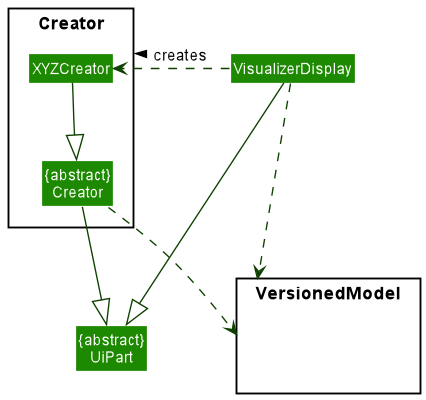
Note that some details are omitted or repeated in the class diagram for better explanation of how the various components of UI work.
Design Considerations
CommandExecutor Functional Interface
- Initial design of AB3: Keeping the CommandExecutor functional Interface inside CommandBox
- Cons: This design initially is supposed to encapsulate the CommandBox UI object, that the command box is able to execute user’s command on behalf of the Logic component. However, the disadvantage of this design is that if there are future extensions requiring more components that can execute commands, like another input box or GUI functionalities, then another interface must be used.
- Current design: Separate CommandExecutor from CommandBox
- Pros: Allows other components of the UI to use the CommandExecutor interface for command execution, and better abstract out the design of Academy Directory, hence making CommandExecutor a medium of communication between the Logic and the UI component. In addition, it serves as a basis for any future extension of Academy Directory.
- Cons: It makes the implementation of the UI segment more complicated in return.
Logic component
API : Logic.java
Here’s a (partial) class diagram of the Logic component:
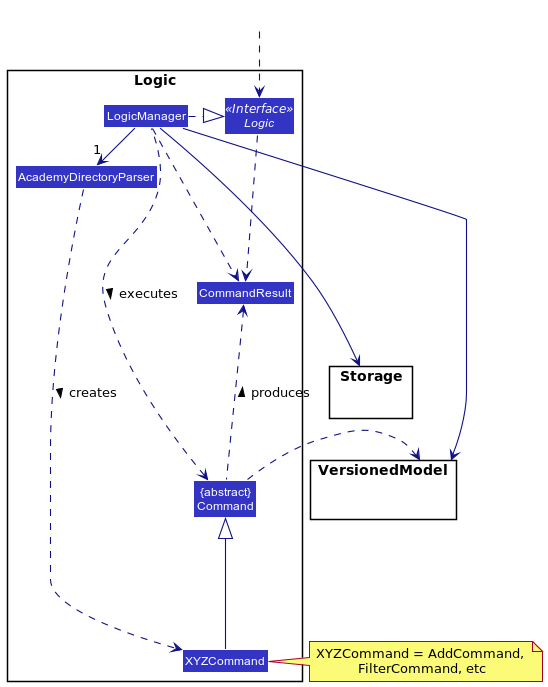
How the Logic component works:
- When
Logicis called upon to execute a command, it uses theAcademyDirectoryParserclass to parse the user command. - This results in a
Commandobject (more precisely, an object of one of its subclasses e.g.,AddCommand) which is executed by theLogicManager. - The command can communicate with the
VersionedModelwhen it is executed (e.g. to add a student). - The result of the command execution is encapsulated as a
CommandResultobject which is returned fromLogic.
The Sequence Diagram below illustrates the interactions within the Logic component for the execute("delete 1") API call.
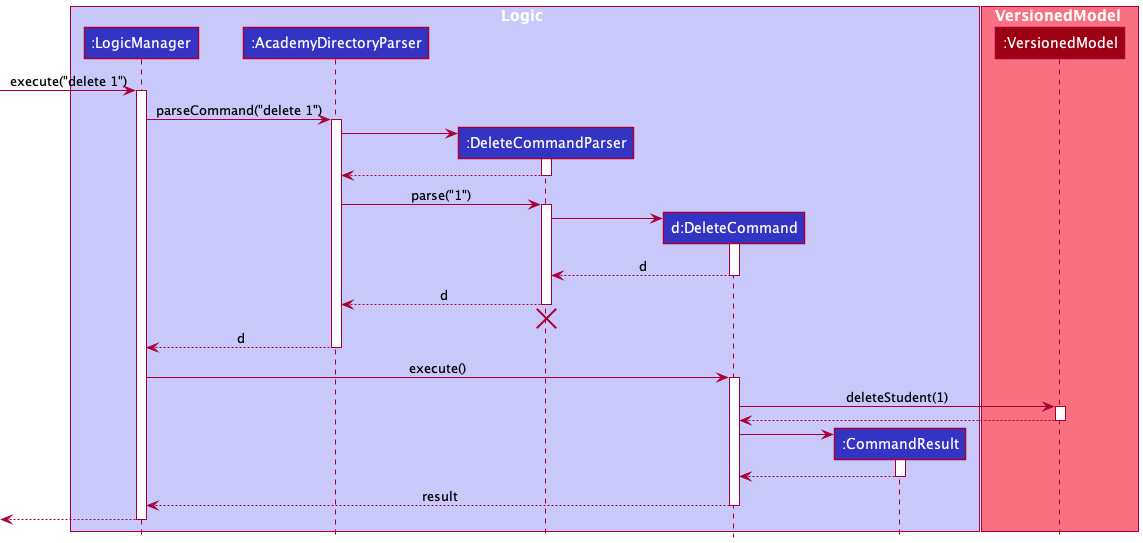
 Note: The lifeline for
 DeleteCommandParser should end at the destroy marker (X) but due to a limitation of PlantUML, the lifeline reaches the end of diagram.
Here are the other classes in Logic (omitted from the class diagram above) that are used for parsing a user command:
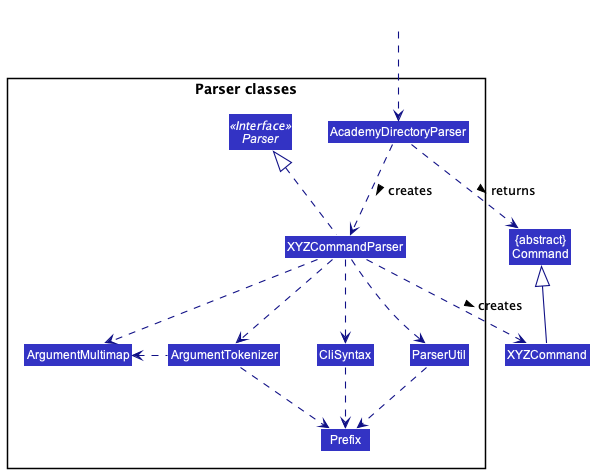
How the parsing works:
- When called upon to parse a user command, the
AcademyDirectoryParserclass creates anXYZCommandParser(XYZis a placeholder for the specific command name e.g.,AddCommandParser) which uses the other classes shown above to parse the user command and create aXYZCommandobject (e.g.,AddCommand) which theAcademyDirectoryParserreturns back as aCommandobject. - All
XYZCommandParserclasses (e.g.,AddCommandParser,DeleteCommandParser, …) inherit from theParserinterface so that they can be treated similarly where possible e.g, during testing.
VersionedModel component
API : VersionedModel.java
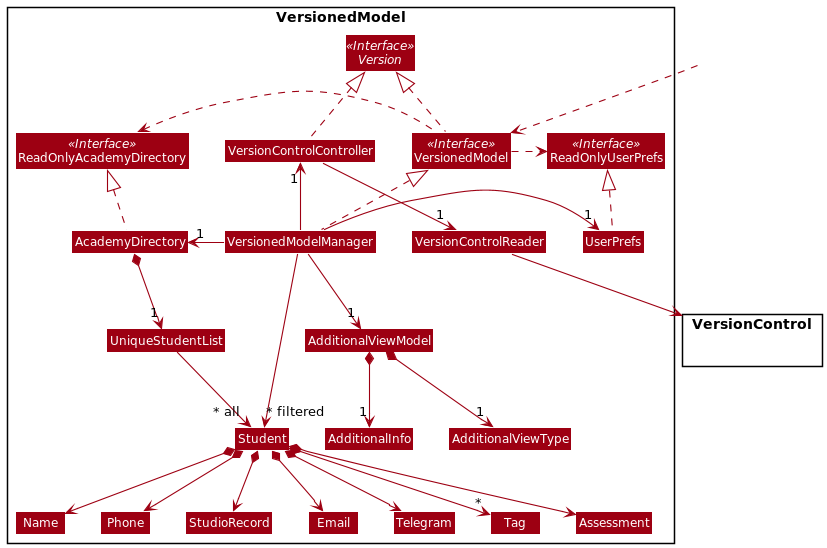
The VersionedModel component,
- stores the academy directory data i.e., all
Studentobjects (which are contained in aUniqueStudentListobject). - stores the currently ‘selected’
Studentobjects (e.g., results of a search query) as a separate filtered list which is exposed to outsiders as an unmodifiableObservableList<Student>that can be ‘observed’ e.g. the UI can be bound to this list so that the UI automatically updates when the data in the list change. - stores a
UserPrefobject that represents the user’s preferences. This is exposed to the outside as aReadOnlyUserPrefobjects. - does not depend on any of the other three components (as the
VersionedModelrepresents data entities of the domain, they should make sense on their own without depending on other components). - interfaces with
VersionControlvia theVersionControlController, which implements theVersionAPI and thus gives theVersionedModelcomponent the ability to interface with version control entities such asCommit. - stores a
AddtionalViewModelthat stores additional information required by the UI’sVisualizerDisplaysuch as number statistic for theVisualizecommand.
The above implementation is chosen because it makes turning off version control relatively simple; a stub VersionControlController
can be used instead.
For more information regarding VersionControl, read here.
Note: An alternative (arguably, a more OOP) model is given below. It has a Tag list in the AcademyDirectory, which Student references. This allows AcademyDirectory to only require one Tag object per unique tag, instead of each Student needing their own Tag objects.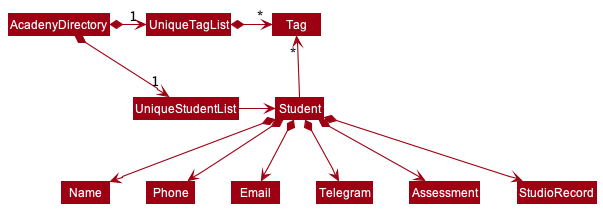
Storage component
API : Storage.java
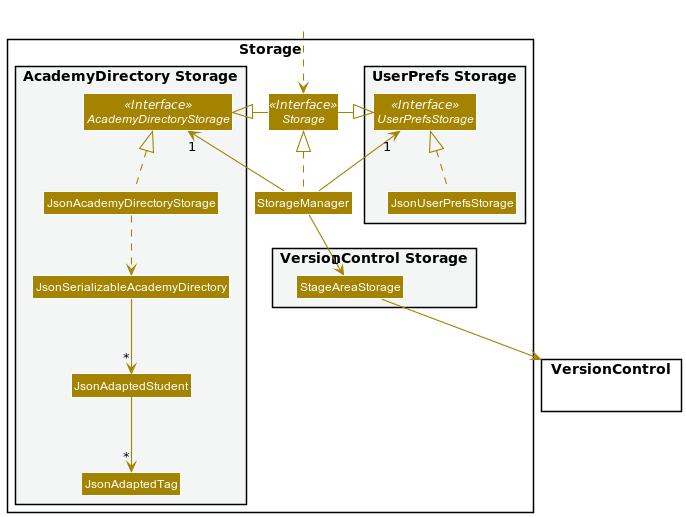
The Storage component,
- can save both academy directory data and user preference data in json format, and read them back into corresponding objects.
- inherits from both
AcademyDirectoryStorageandUserPrefStorage, which means it can be treated as either one (if only the functionality of only one is needed). - depends on some classes in the
VersionedModelcomponent (because theStoragecomponent’s job is to save/retrieve objects that belong to theVersionedModel). - can write version control objects to disk.
Common classes
Classes used by multiple components are in the seedu.academydirectory.commons package.
VersionControl Component
The internal version control system in Academy Directory is inspired by Git. As such, VersionControl
keeps track of Academy Directory data state by using VcObject which corresponds to Git objects.
Design Considerations:
Aspect: How to save state changes
-
Alternative 1 (current choice): Saves state changes to disk ala Git
- Pros:
- future-proof; even when Academy Directory supports adding and tracking many files e.g. profile pictures of students, code screenshots etc.
- provides backbone for additional features e.g. regeneration of data even when data becomes corrupted, etc.
- Undo, redo, and history operations can be implemented easily
- Undo and redo operations can still be done even when application is closed and opened again
- Cons: Complex implementation
- Pros:
-
Alternative 2: Saves state changes in memory:
- Pros: Easy to implement
- Cons: Lacks future-proofness of the first alternative
VersionControl Objects
Shown below is the corresponding class diagram:
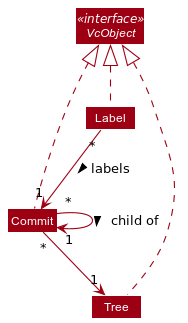
Explanation of the objects shown above:
-
Tree:- represents a snapshot of
datadirectory of Academy Directory. It maintains a mapping between version-controlled filenames and actual filename of tracked blobs. - Version controlled name is by default
SHA-1hash of the blob. However, it is possible to change this toSHA-256or evenMD5. - Supported hash functions are present in
HashMethod
- represents a snapshot of
-
Commit:- saves information regarding the changes to Academy Directory data:
- who makes the change
- when was the change made
- what change was made exactly.
- points to a
Treewhich represents the snapshot of data after the change is made - points to a
Commitobject which represents the parent of the currentCommitobject
- saves information regarding the changes to Academy Directory data:
-
Label:- labels a
Commit - relevant labels are
HEADwhich represents the current commit,MAINwhich represents current branch, andOLDwhich represents the most recent branch before the current branch.
- labels a
A few implementation details:
- A
VcObjectdoes not actually hold a reference to anotherVcObject; rather it has aSupplierof theVcObjectthat it’s supposed to have a reference to. This is to defer read operations to avoid memory overhead. - Equality of
VcObjectis checked using its hash. This follows the idea that a hash is intended to be a reliable fingerprint, and the chosen hash function (SHA1) has a (very) low probability of collision. - All classes which extends
VcObjectclass should have a singleton NULL private instance. This reduces headache in terms of handling edge cases e.g. root of commit tree, exception handling, etc. The NULL singleton is used to indicate failure for whatever reason, and allows the application to remain operational. - Class-specific implementation details:
-
Treesupports an additional methodTree#regenerateBlobs(), which regenerate the files maintained by the saidTree. -
Commitsupports a few additional methods which reflect the underlying commit tree:-
Commit#findLca(Commit)finds the lowest common ancestor of two commits, returningCommit.emptyCommit()if no common ancestor can be found. -
Commit#getHistory()returns all commits from given commit to the root of the commit tree. -
Commit#getHighestAncestor()returns the commit ancestor that is the furthest away, limited by the given end Commit or by the root of the commit tree.
-
-
Design Considerations:
Aspect: Which change to track
-
Alternative 1 (current choice): Tracks changes at the file level
- Pros: Easy to implement
- Cons: May have performance issues in terms of disk space and memory usage
-
Alternative 2: Tracks changes at the line level of the file:
- Pros: Lower disk space requirements
- Cons: Difficult to implement
Possible improvements in the future:
- Explore implementing
VcObjectas a proper monad with the bind operator, considering the clear relationship between the differentVcObject.
Interfacing with other components
Both the Storage component and VersionedModel component interfaces with VersionControl
for different reasons:
-
Storage: needs to be able to writeVcObjects to disk -
VersionedModel:- needs to be able to read
VcObjects from disk. - needs to be able to create new
VcObjects. However, this requires computing theVcObjectfile representation’s hash i.e.VersionedModelneeds minimum write access to disk to be able to compute hash
- needs to be able to read
As such, VersionControl provides three facade classes, each representing one of the above requirements. The following
class diagram shows this:
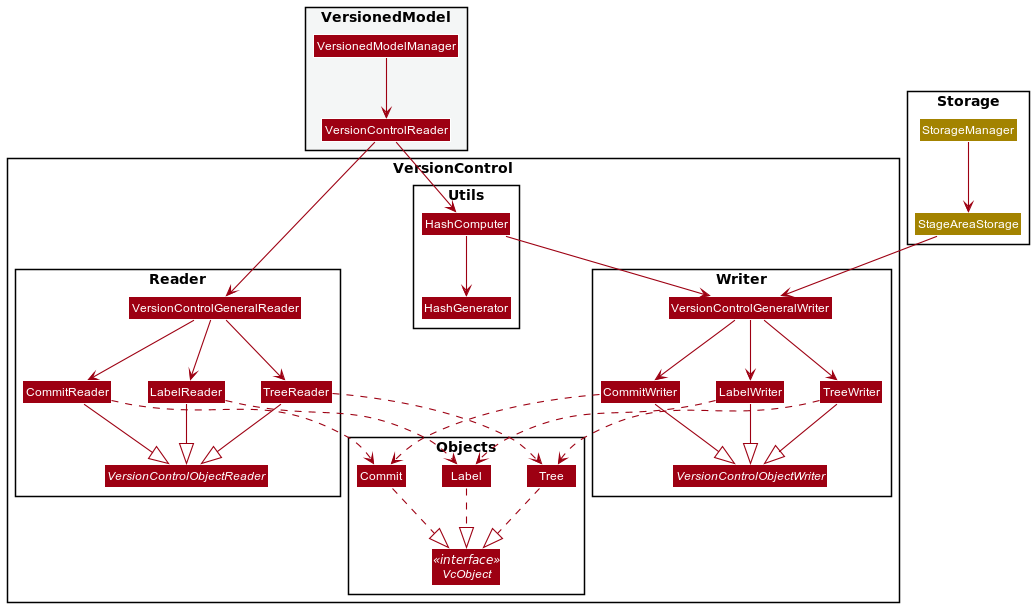
The facade classes are:
-
VersionControlGeneralReader: to readVcObjectfrom disk -
VersionControlGeneralWriter: to writeVcObjectto disk -
HashComputer: to compute hash of a file or hash of aVcObject. MUST NOT expose actual write methods as this would allowVersionedModelto write to disk, breaking abstractions.
To modify disk representation of a particular class which extends from VcObject, modify both its Reader
and Writer.
Design Considerations:
Aspect: How to represent VcObject in disk
-
Alternative 1 (current choice): Custom representation
- Pros: Smaller disk space utilisation
- Cons: Added layer of complexity
-
Alternative 2: Standard representation e.g. JSON
- Pros: Parsing is simple i.e. use Jackson library
- Cons: Larger disk space utilisation
Considering that VcObjects are not very complicated, the added layer of complexity does not outweigh
the benefits of smaller disk space utilisation in our opinion. Hence, we go for alternative 1.
Possible improvements in the future:
- Make version control folder hidden from user
- Make version control files read-only. This is best done if future iterations implement a login system
- Use delta encoding to keep track of
VcObject
Implementation
This section describes some noteworthy details on all features are implemented. Note that the section only discusses the implementation details of the Command classes, and not the Parser classes, for brevity purposes. Details of Parser classes check are included within the explanation below, in combination with the Command classes.
Managing Students’ Personal Details
AddCommand
This command adds a new Student to AcademyDirectory.
Implementation
AddCommand will extend the Command class and will consequently @Override the Command#execute() method to serve the aforementioned purpose.
The AddCommand is a version controlled command. For the list of version controlled command, refer here.
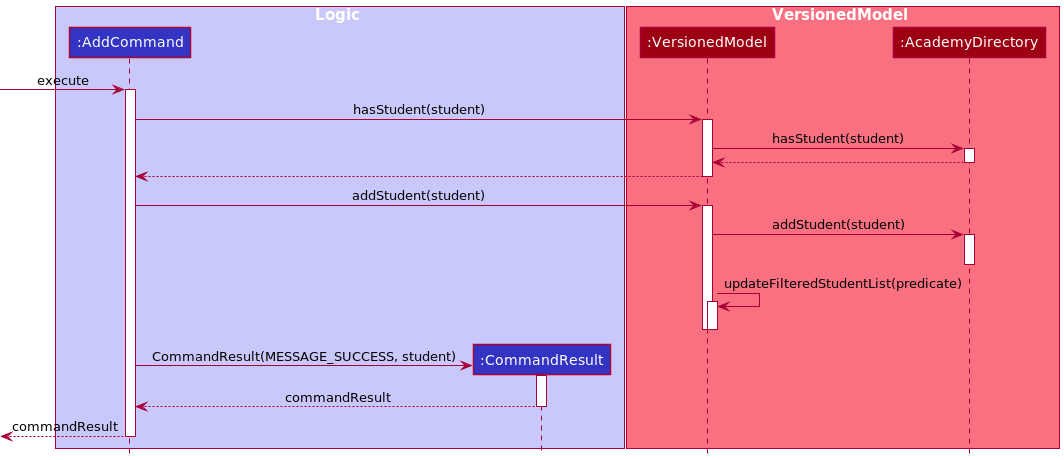
AddCommand adds students to the AcademyDirectory. This command prevents addition of duplicate students by ensuring that each Student has a unique NAME.
The NAME field is a sufficiently unique field to identify a unique instance of a student because AcademyDirectory is scoped to
service CS1101S Avengers. In the CS110S module each Studio has at most 10 Students. Thus, the probability of a NAME collision being sufficiently minimised.
Note: The responsibility of ensuring that Student
does not have unnecessary duplicate personal detail (e.g same PHONE) is left to the Avenger.
The specifics are shown in the sequence diagram below:
DeleteCommand
This command deletes a Student from AcademyDirectory.
Implementation
DeleteCommand will extend the Command class and will consequently @Override the Command#execute() method to serve the aforementioned purpose.
The DeleteCommand is a version controlled command. For the list of version controlled command, refer here.
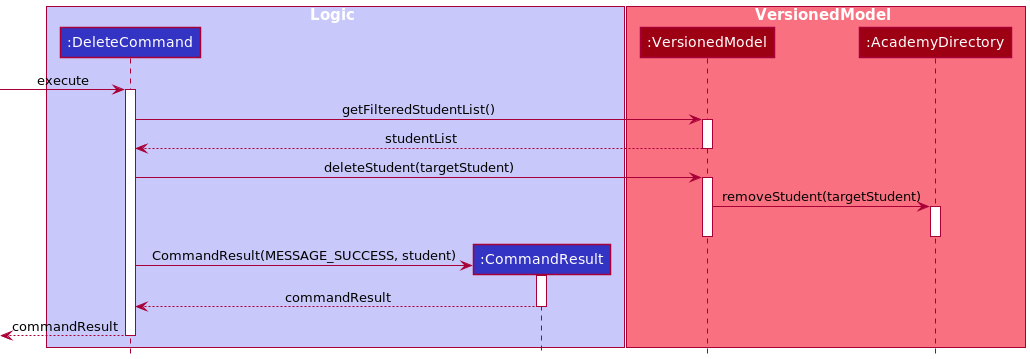
DeleteCommand deletes Student based on the relative INDEX in the ObservableList which is the list of Student viewed by the Avenger. To do this, DeleteCommand makes a call to VersionedModel#deleteStudent().
The specifics are shown in the sequence diagram below:
TagCommand
This command assigns tags to a Student.
Implementation
TagCommand will extend the Command class and consequently @Override the Command#execute() method
to serve the aforementioned purpose. The TagCommand is a version controlled command. For the list of version controlled command, refer here.
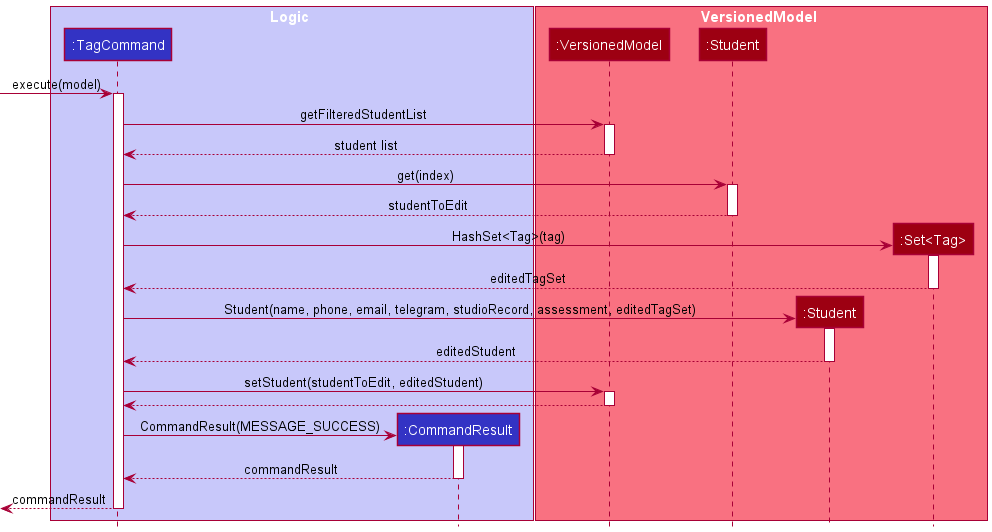
TagCommand tags a Student based on the relative INDEX in the ObservableList. The Tag is implemented with a HashSet
that stores the Tag. When TagCommand is executed, the Student’s Tag attribute will be replaced by a new HashSet
containing the input Tag object(s). In the event the input Tag is empty, the Student’s Tag attribute will be replaced by an
empty HashSet.
The following sequence diagram describes what happens when TagCommand is executed:
GetCommand
This command serves to retrieve a specific PersonalDetail of students or a student.
Implementation
GetCommand will extend the Command class and will consequently @Override the Command#execute() method to serve the aforementioned purpose.
All fields of Student class which implements the PersonalDetail interface and whose prefix is present in
GetCommand#SUPPORTED_PREFIX can be queried by GetCommand.
A GetCommand is initialized with a list of Prefix objects which represents the prefix of the PersonalDetail
to be retrieved, and a list of String which represents the keywords that will be matched with
the names of students in Academy Directory. List of Prefix cannot be empty, but list of keywords can be.
An empty list of keywords is interpreted as retrieving personal details of all students in the model. If
list of keywords is not empty, then the pattern-matching behavior for name in GetCommand is similar to that
of the FilterCommand.
The specifics are shown in the sequence diagram below:
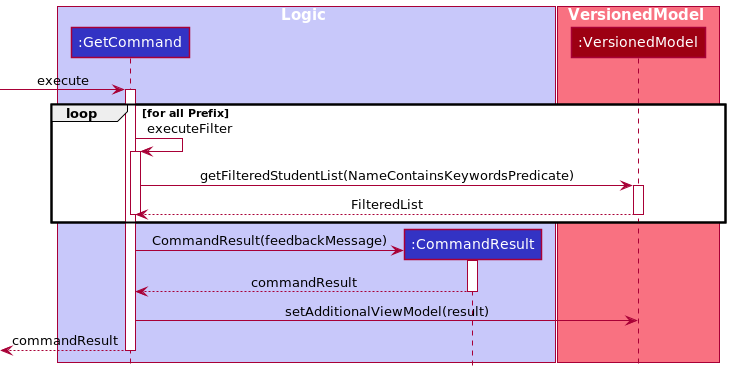
Because the output of GetCommand can be long, for readability reasons the result is displayed
in the AdditionalView part of the UI.
EditCommand
This command edits a Student’s personal details such as their NAME, PHONE, TELEGRAM and EMAIL.
Implementation
EditCommand will extend the Command class and will consequently @Override the Command#execute() method to serve the aforementioned purpose.
The EditCommand is a version controlled command. For the list of version controlled command, refer here.
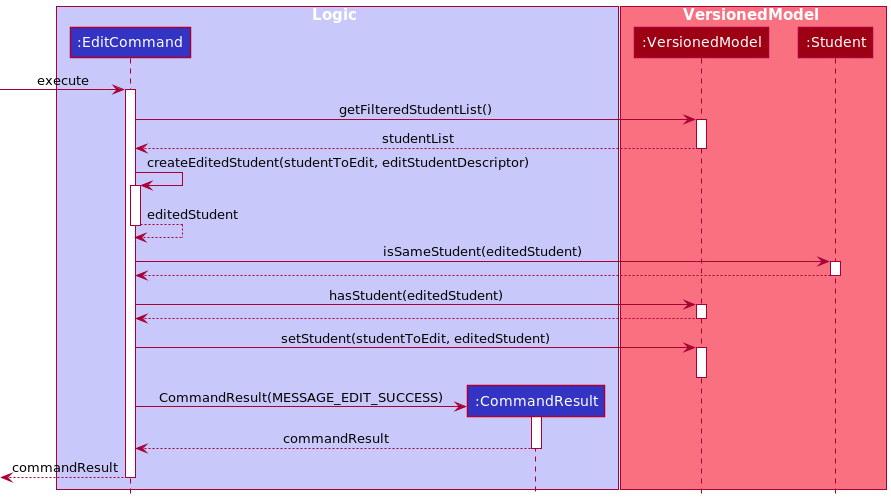
Similar to AddCommand, EditCommand supports duplicate prevention by checking that the NAME being edited is unique in the list
unless the NAME is the same as the Student being edited.
Note: The responsibility of ensuring that Student
does not have unnecessary duplicate information (e.g same PHONE) is left to an Avenger.
The following sequence diagram describes what happens when EditCommand is executed:
Track Students’ Grades, Studio Attendance, and Participation
GradeCommand
This command serves to update the Grade of various Assessment that the students will undergo in CS1101S. The assessments include RA1, Midterm, RA2, Practical Exam (PE), and Final.
Implementation
GradeCommand will extend the Command class and will consequently @Override the Command#execute() method to serve the aforementioned purpose.
The GradeCommand is a version controlled command. For the list of version controlled command, refer here.
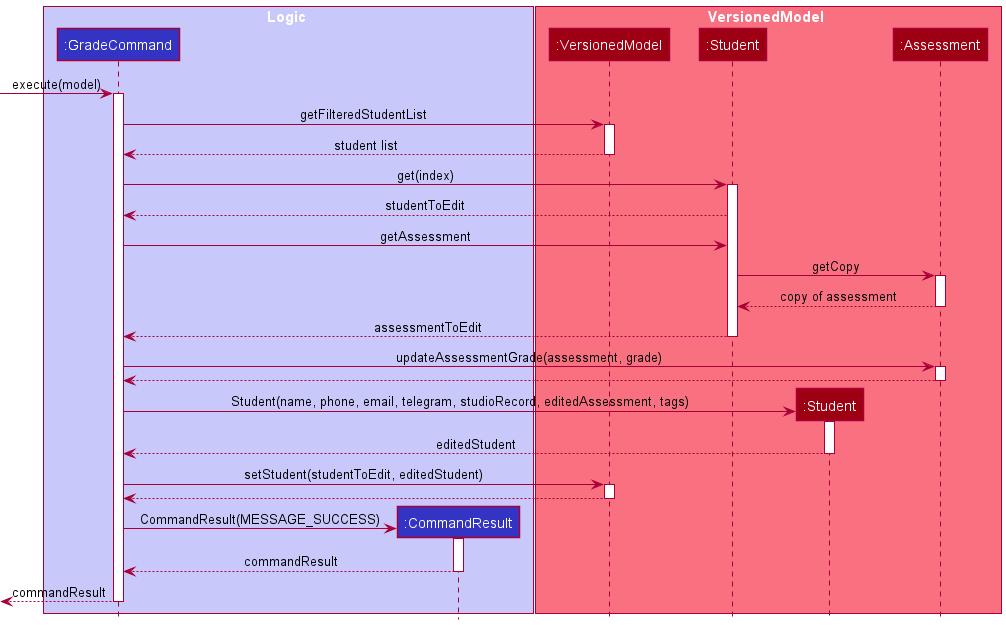
The recording of grade is facilitated by adding an Assessment parameter to the Student.
The Assessment is implemented with a HashMap that stores the String representation of the assessments as the keys, and the integer Grade as the values.
The following sequence diagram describes what happens when GradeCommand is executed:
AttendanceCommand
This command serves to update the attendance status of students. A student’s Attendance can be either attended or unattended.
Implementation
AttendanceCommand will extend the Command class and will consequently @Override the Command#execute() method to serve the aforementioned purpose.
The AttendanceCommand is a version controlled command. For the list of version controlled command, refer here.
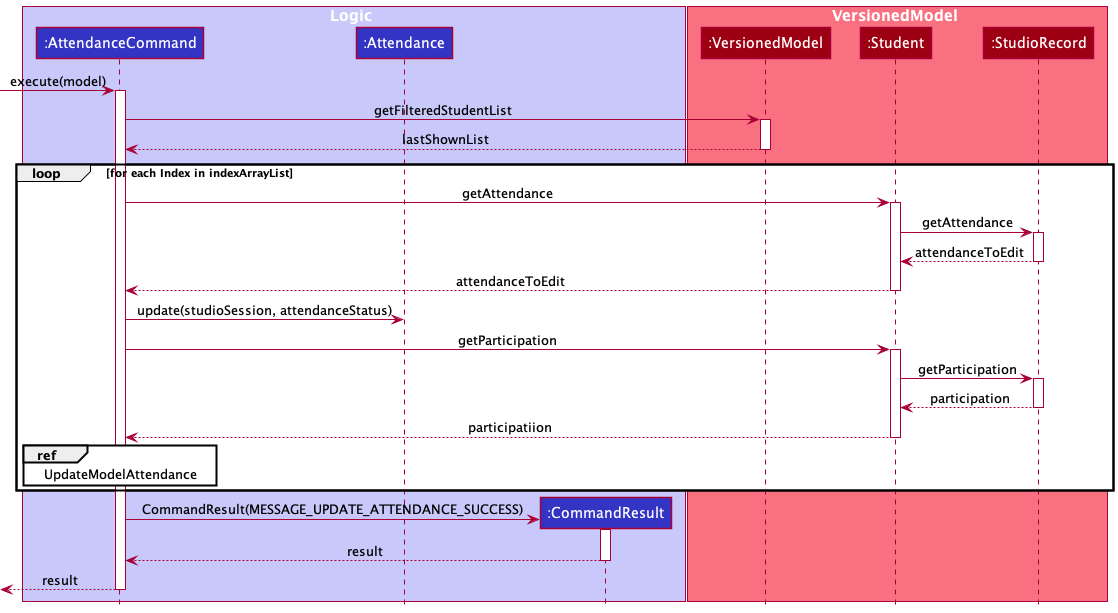
The attendance mechanism is facilitated by adding a StudioRecord parameter to the Student. This StudioRecord has an Attendance object which we can use to track and update the Attendance of the Student. Attendance implements Information and the actual storing of the attendance status is done with a boolean array.
The following sequence diagram describes what happens when AttendanceCommand is executed:
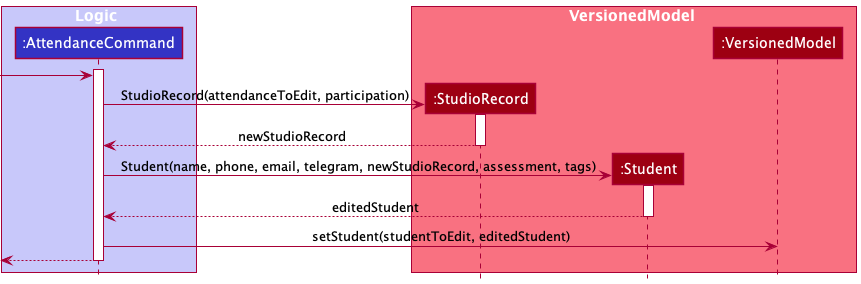
For UpdateModelAttendanceSequenceDiagram, the sequential diagrams can be found below:
ParticipationCommand
This command serves to update the Participation score of students. Following the XP system for CS1101S, each student is awarded between 0 and 500 XP (inclusive) per Studio session.
Implementation
ParticipationCommand will extend the Command class and will consequently @Override the Command#execute() method to serve the aforementioned purpose.
The ParticipationCommand is a version controlled command. For the list of version controlled command, refer here.
The implementation is similar to AttendanceCommand, with the same sequence diagram being applicable for Participation given that the proper refactoring to Participation is done.
ParticipationCommand has an additional section in the sequence diagram located above the loop in AttendanceCommand. The purpose of the logic below is to update a student’s Attendance to be marked as present if the participationUpdate is greater than 0. This is because a student that has a positive Participation score would also count as having attended the Studio.
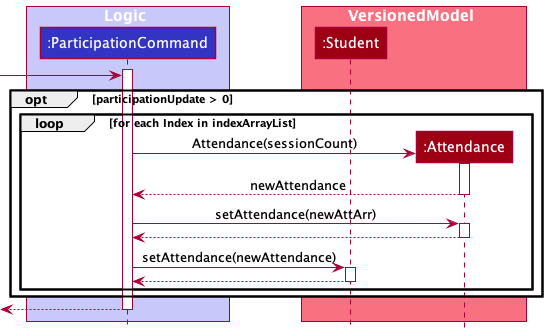
Note: The logic above is to update the Attendance and is only executed in the event that participationUpdate is more than 0. Otherwise, it will not run.
Visualization Tools
ViewCommand
This command serves to display the summarised details of a single Student in the AcademyDirectory based on the index
number of the student. If the index is invalid (not a positive integer or exceeds the list size), then an error message will be shown instead
and ViewCommand will not be created.
Implementation
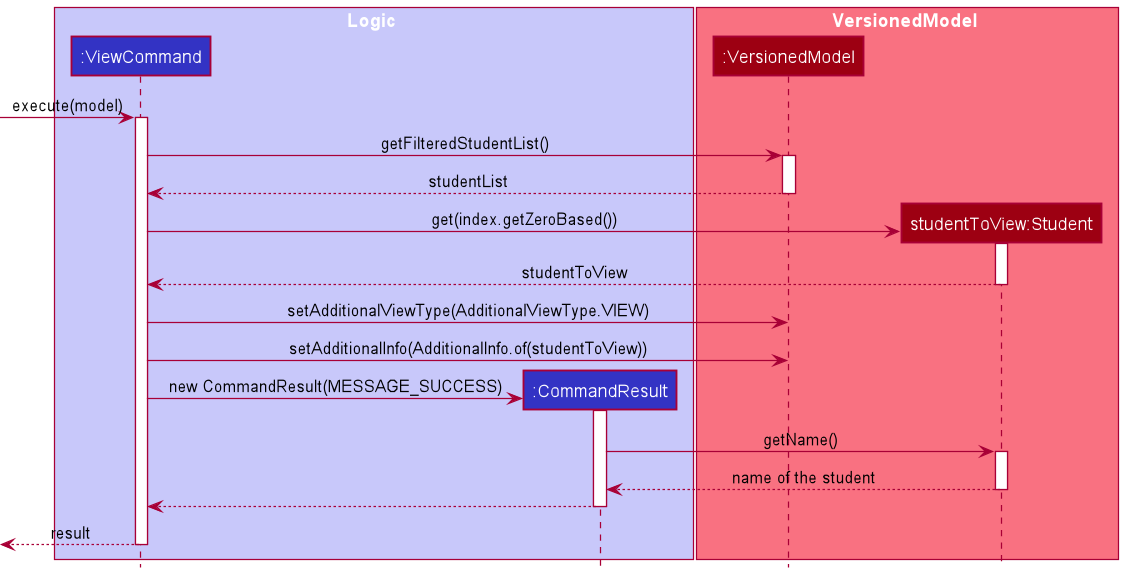
ViewCommand displays the Student based on the relative INDEX in the ObservableList which is the list of Student viewed by the Avenger.
It extends the abstract class Command and will consequently @Override the Command#execute() method to serve the aforementioned purpose.
Once the index and the student associated with the index is retrieved, it is set on the Additional View Model - with its associated type and info, to send to the UI for display. A success message containing the name of the student is later returned.
A noteworthy detail in implementation of ViewCommand (not related to logic) is that student grades and participation score are wrapped inside a drop-down menu on the UI, and users will need to click on the menu to see the details of the students.
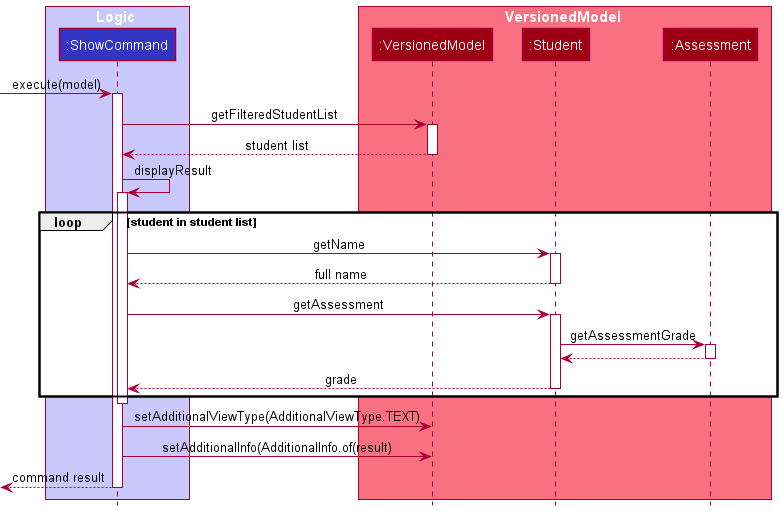
ShowCommand
This command serves to display the collated score of all students in the Academy Directory for a specific Assessment. The assessments that can be queried are: RA1, Midterm, RA2, Practical Exam (PE), and Final.
Implementation
ShowCommand will extend the Command class and will consequently @Override the Command#execute() method to serve the aforementioned purpose.
The grades are collated by iterating through all the students and extracting the score from the Assessment HashMap using the input Assessment as the key.
The information is formatted into a String and displayed in the AdditionalView. The success message is parsed into CommandResult to be returned by ShowCommand.
The following sequence diagram describes what happens when ShowCommand is executed:
VisualizeCommand
This command provides a Box Plot of the performance of all Student in AcademyDirectory in all Assessment.
Implementation
VisualizeCommand will extend the Command class and will consequently @Override the Command#execute() method to serve the aforementioned purpose.
The grades are collated by iterating through all the students and extracting the grades from the Assessment HashMap using the input Assessment as the key.
The information is returned as a HashMap with key being the Assessment name and value being a list containing the class’ grade in that assessment.
The information will be displayed in the AdditionalView. The success message is parsed into CommandResult to be returned by VisualizeCommand.
The following sequence diagram describes what happens when VisualizeCommand is executed:
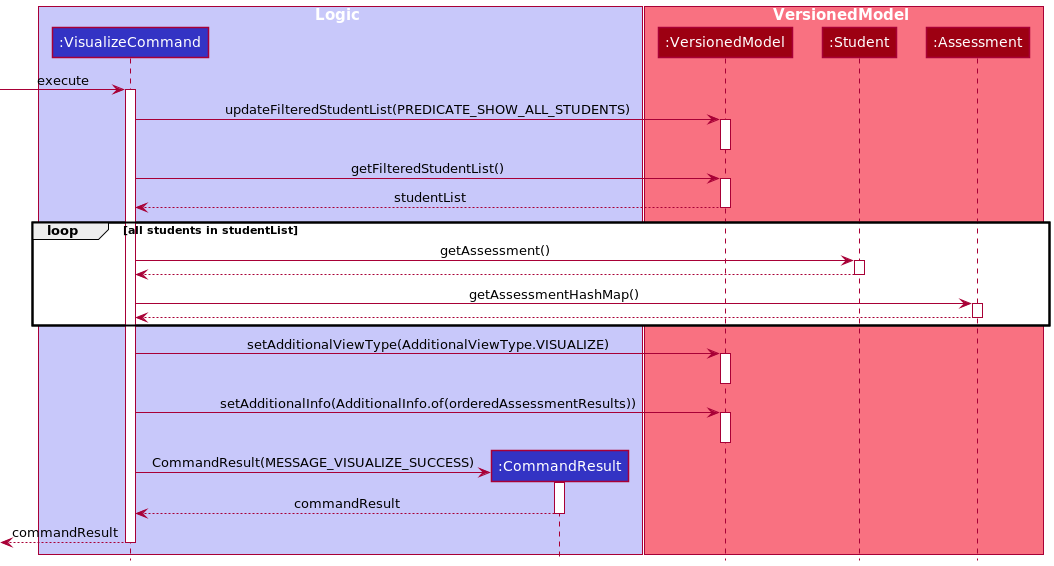
Note that this is a singular command - meaning that no other argument should follow visualize.
FilterCommand
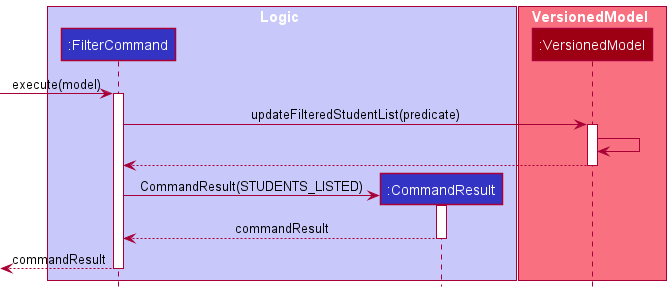
This command filters the ObservableList by Name or Tag.
Implementation
FilterCommand will extend the Command class and will consequently @Override the Command#execute() method to serve the aforementioned purpose.
The FilterCommand searches the AcademyDirectory for students with Name or Tag matching the keyword and displays
the student list with the filtered students.
The following sequence diagram describes what happens when FilterCommand is executed:
SortCommand
This command sorts the AcademyDirectory student list based on their Participation, Assessment and Name. When sorting by Assessment, users have the option of sorting by individual Assessment or by the average grade among. Users can also choose if they want to sort by ascending or descending.
Implementation
SortCommand will extend the Command class and will consequently @Override the Command#execute() method to serve the aforementioned purpose.
The SortCommand is a version controlled command. For the list of version controlled command, refer here.
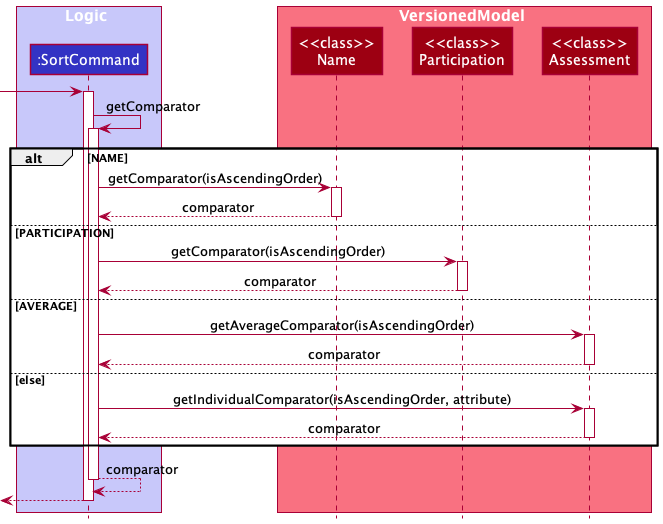
The sorting mechanism is based on the List interface as it sorts the various FilteredList instances using Comparator. Based on the attribute of the SortCommand being executed, the Comparator differs as shown by the sequential diagram below:
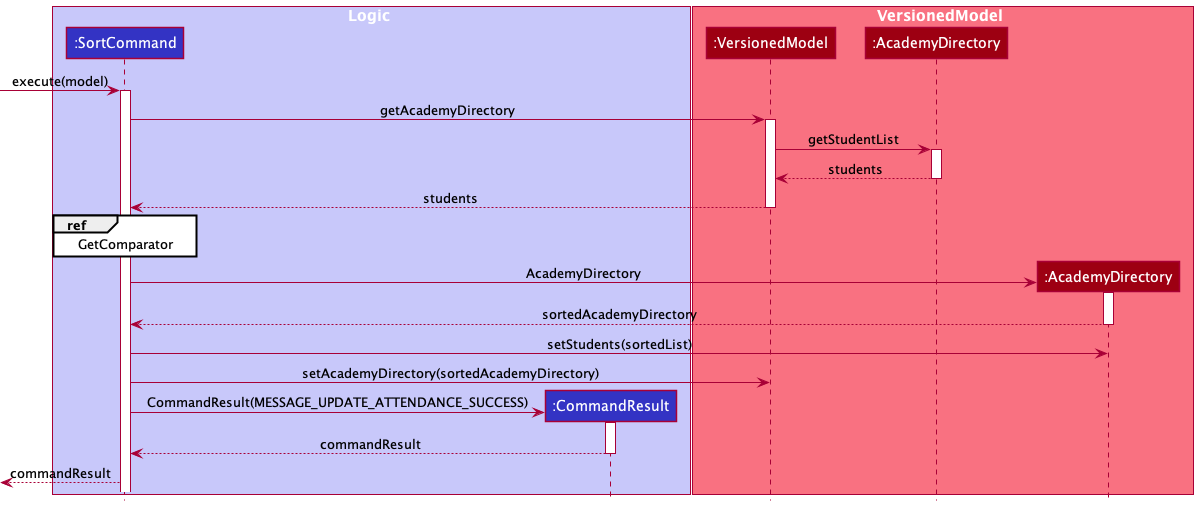
The reference frame for GetComparator can be found below. It details the selection process based on the attribute of the SortCommand.
Others
ExitCommand
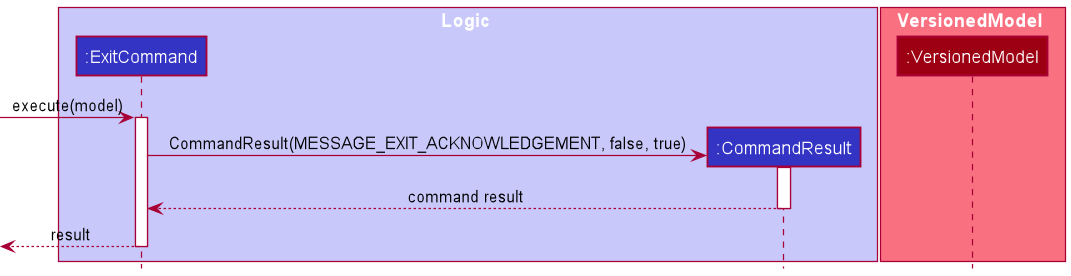
This command allows user to exit the application after saving all operations and data. It extends the Command class and will consequently @Override the Command#execute() method to serve this purpose.
Note that this is a singular command - meaning that no argument should follow after exit.
Implementation
ListCommand
This command shows all students on the class, ordered by when the student is added to the Academy.
Implementation
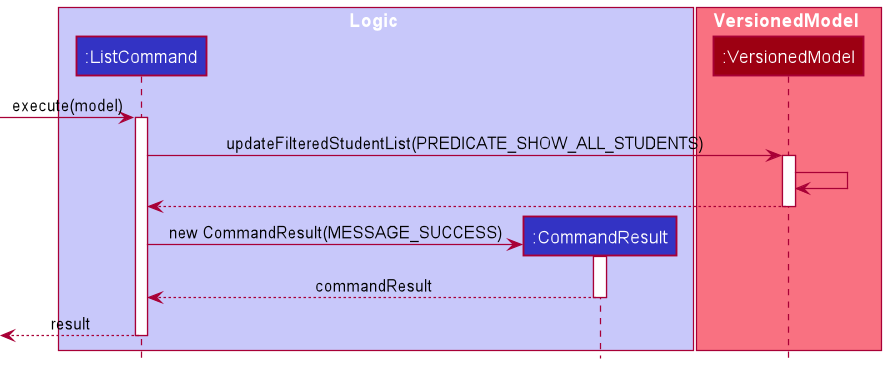
ListCommand will extend the Command class and will consequently @Override the Command#execute() method to serve the aforementioned purpose.
ListCommand retrieves the student list and display it on the student list panel on the left side. All students will be displayed.
Note that this is a singular command - meaning that no argument should follow after list.
ClearCommand
This command clears all Student entries from AcademyDirectory.
Implementation
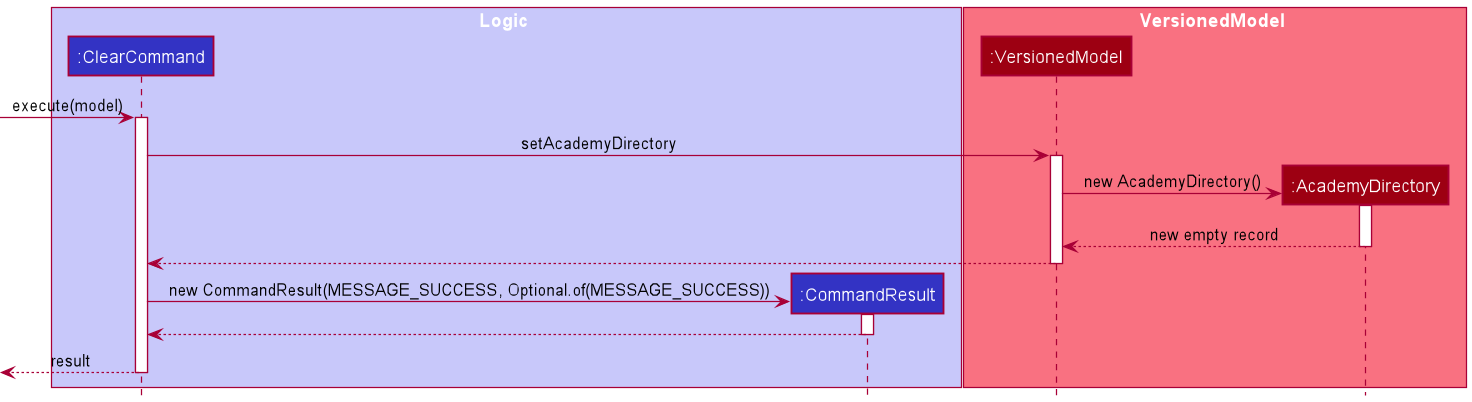
ClearCommand will extend the Command class and will consequently @Override the Command#execute() method to serve the aforementioned purpose
and is Version Controllable. A new Academy Directory is created to replace the current one, meaning that the student list is set to empty.
Note that this is a singular command - meaning that no argument should follow after clear.
The ClearCommand is a version controlled command. For the list of version controlled command, refer here.
HistoryCommand
This command shows the commit history. Each commit will be shown with its five character hash,
author, date, and commit message. Only commands that are version controlled will result in a commit
being created and thus shown by HistoryCommand. Commands which can be undone are referred to as version controlled commands (read here
for details on what this means).
This command is meant for:
- reminding users what changes were made to the underlying
AcademyDirectoryData - revealing (five character) hash of commits that can be used with
RevertCommand.
Implementation
HistoryCommand will extend the Command class and will consequently @Override the Command#execute() method to
serve the aforementioned purpose.
The HistoryCommand makes use of the following set of invariance:
- The most recent commit that belongs to the current branch is always labelled as
MAIN - The most recent commit that belongs to the second-most-recent branch is always labelled
as
OLD
These guarantees are assured by the VersionedModel#commit method. Note that HEAD and MAIN need not
refer to the same commit e.g. if the user reverts to a previous commit then MAIN and HEAD will refer to
different commits.
Because this set of invariance are respected, thus HistoryCommand can show commit history by doing the following:
- fetch the commits labelled as
MAINandOLDfrom disk (methods to do this exposed byVersionedModel) - find the lowest common ancestor between
MAINandOLD(Commit#findLcamethod used here) - show all commits from initial commit until the lowest common ancestor found above normally
- show all commits from the lowest common ancestor until
MAINandOLDas per the desired formatting
The following sequence diagram shows the above implementation:
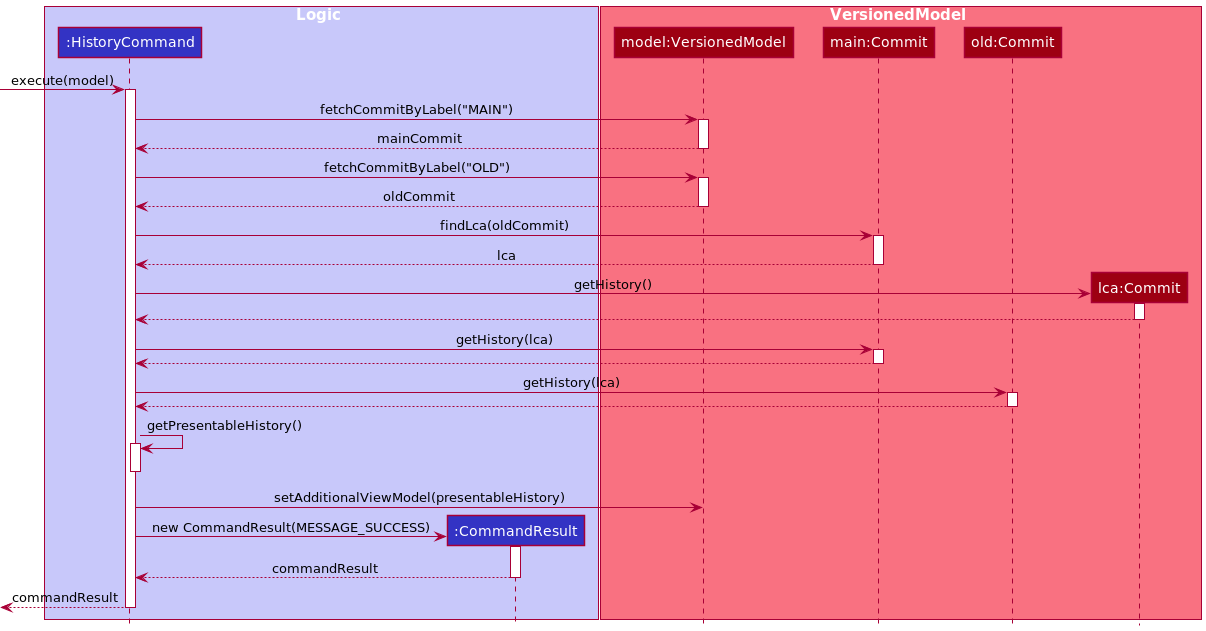
Note that the above diagram is omits several details but should be sufficient to grasp how HistoryCommand works.
In addition, this is a singular command - meaning that no argument should follow after history.
Limitation
The current implementation can only show two commit branches: MAIN and OLD. While this is
sufficient in most cases, the ability to show arbitrary number of commit branches to give users
the ability to revert to any previous commits easily without having to look for the commit’s hash
manually in disk. However, due to the implementer’s inability to figure out how best to show
arbitrary number of commit branches, the current HistoryCommand thus can only show two branches.
RevertCommand
This command reverts the underlying AcademyDirectory data to a previous commit, as identified by the commit’s hash.
Commands which can be undone are referred to as version controlled commands (read here
for details on what this means). The following is true regarding RevertCommand:
- If any of the following occurs which leads to a failure in parsing commit file in disk, no changes
are made to the underlying disk:
- provided hash cannot be found on disk
- commit file with the given hash exists, but is corrupted
- commit file with the given hash exists, but no read access is given to AcademyDirectory
- other reasons which leads to failure in reading commit file
- Otherwise, the
AcademyDirectorystorage data will be restored according to the target commit to be reverted to.
Implementation
RevertCommand will extend the Command class and will consequently @Override the Command#execute() method to
serve the aforementioned purpose.
RevertCommand reverts state of AcademyDirectory data by doing the following:
- fetch commit identified by the given hash
- shift
VersionedModel’sHEADpointer to the commit - restores the academy directory data according to the tree that the fetched commit points to
The following sequence diagram shows the above implementation:
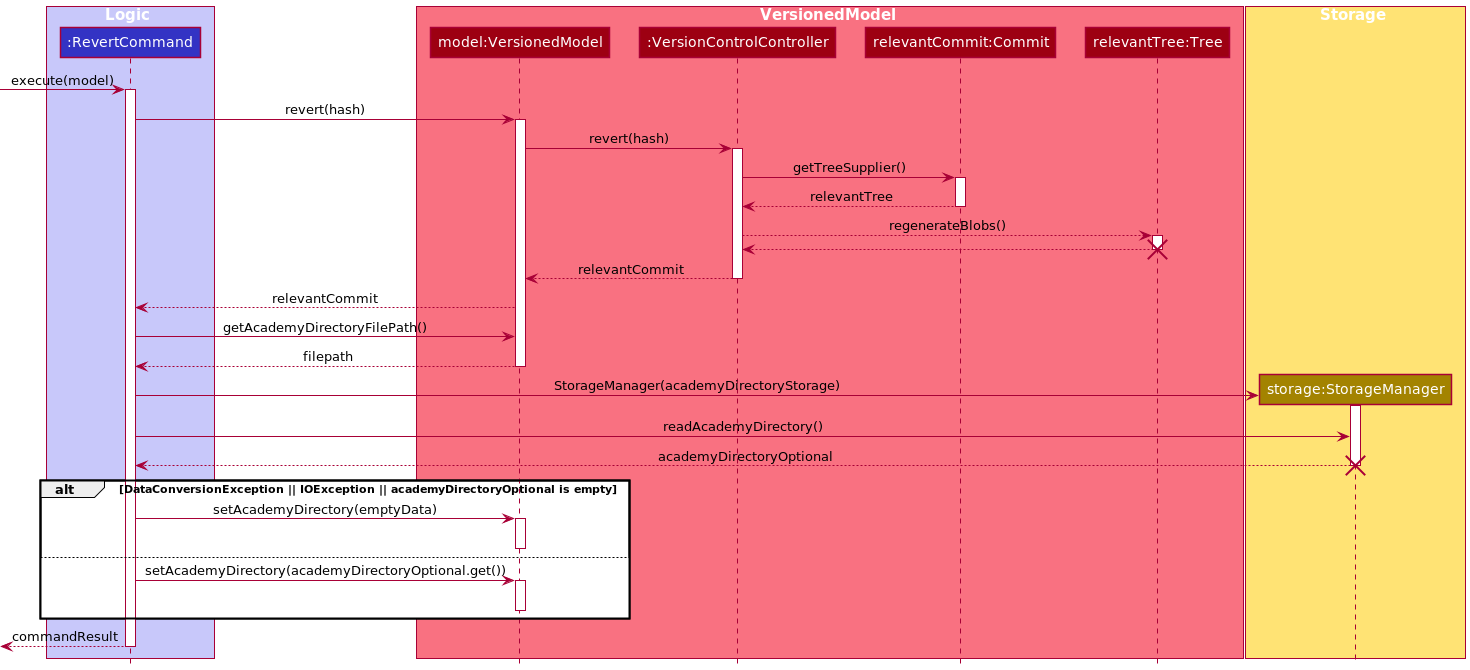
Note that the above diagram is incomplete; it is approximately accurate but is sufficient to help explain the limitation
of RevertCommand, as in below.
Limitation
Because RevertCommand has to restore academy directory data which is the responsibility of the
Storage component, RevertCommand creates a StorageManager and uses it to load data from disk
and set the current VersionedModel internal data to the newly reloaded data. This is indicated in the sequence diagram
as the sudden use of Storage component directly from RevertCommand. This is (highly) not
ideal, but the implementer has no idea how to do this properly i.e. without sudden creation of a new StorageManager
. Right now the solution is to ensure that this newly created StorageManager is destroyed immediately to prevent
access from elsewhere, and to put this limitation in this documentation to be solved one day.
UndoCommand
This command undoes a change done to the underlying AcademyDirectory data. Note that this is
different from the view of the data e.g. when the ViewCommand is used, the view visible to
the user changes, but the underlying data does not change. Commands which can be undone are referred to
as version controlled commands (read here for details on what this means).
Implementation
UndoCommand will extend the Command class and will consequently @Override the Command#execute() method to
serve the aforementioned purpose. Internally, the UndoCommand makes use of the RevertCommand.
Hence UndoCommand serves as syntactic sugar for the RevertCommand.
Note this is a singular command - meaning that no argument should follow after undo.
RedoCommand
This command redoes a change done to the underlying AcademyDirectory data. Note that this is
different from the view of the data e.g. when the ViewCommand is used, the view visible to
the user changes, but the underlying data does not change. Commands which can be redone are referred to
as version controlled commands (read here for details on what this means).
Implementation
RedoCommand will extend the Command class and will consequently @Override the Command#execute() method to
serve the aforementioned purpose. Internally, the RedoCommand makes use of the RevertCommand.
Hence RedoCommand serves as syntactic sugar for the RevertCommand.
Note that this is a singular command - meaning that no argument should follow redo
HelpCommand
This command serves to guide new users on using the application, which syntax to use and when to use them. Users can view a summary of all commands’ syntax, or a specific guide on how to use a particular command. Note that if the command in queried are not exact, or if the command does not exist, then HelpMessage will not be created.
Design considerations
In implementing the Help Command, two alternative options were proposed in taking what the help message should be:
- To parse the help message directly from the User Guide
- Pros: This is a more logical way to get the help message, relying on a parser that identifies the common starting section of each command on the User Guide
- Cons: Unfortunately, in doing so, there was a bug exception FileNotFoundException, of which HelpCommand cannot take the help message directly from the User Guide because it cannot find the file. Keeping the help message on the /resources folder was a solution, but the risk of file cannot be read is still there depending on the Operating System that Academy Directory is working on. In addition, this creates the risk of the parser working incorrectly if the header section of the User Guide changes.
- To store a HELP_MESSAGE field in each command class
- Pros: Does not rely on external file, and is not prone to FileNotFoundException. Also, it encapsulates the object better, with each command having an associated static field of HELP_MESSAGE inside it (except for HelpCommand itself), and could be considered a good design pattern.
- Cons: This requires the help message to be constantly updated manually by the developer, each time the User Guide changes. In addition, the length of the help message makes the Command classes harder to read.
Ultimately, Solution 2 was adopted to reduce the risk of bugs on Help Command being vulnerable to FileNotFoundException error, and to better encapsulate the Command classes. In addition, Academy Directory will always require maintenance from the developers, and it is not a bad thing to keep the HELP_MESSAGE updated to the User Guide changes continuously.
Hence, one of the limitations to HelpCommand is the longer and harder-to-read content of String message, which can make it difficult for reviewers to look on. In addition,
help can only work when the command in queried is exact, meaning that it does not work for partial instructions in case of user’s typo, like addd or partcpation. This
is a valid use-case for Academy Directory in a sense that users who mistype command often need better instruction than a general help summary. A future extension could be to
allow auto-suggestion and auto-assistance for help, for a more comprehensive assistance system.
Implementation
HelpCommand will extend the Command class, and consequently @Override the Command#execute() method to serve its initial purposes.
The mechanism of the command is done by retrieving a HELP_MESSAGE field in each of the other command classes (other than HelpCommand itself).
This help message will be displayed to the user on a separate window of the UI.
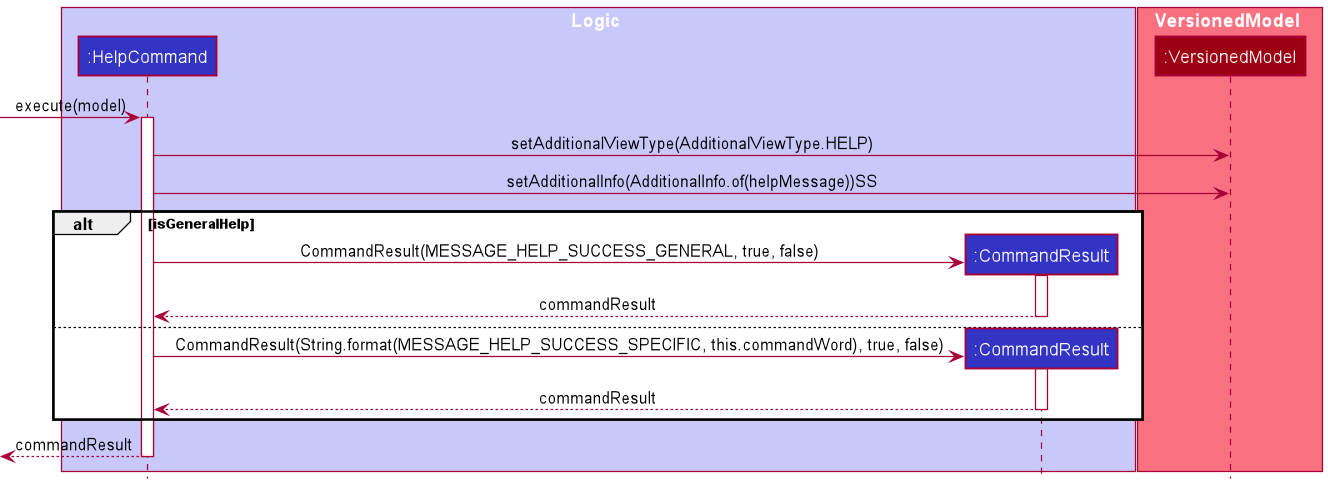
Help Command will check whether the queried help is a general help (meaning that a summary table of all command formats should be shown to users), or is a specific help (meaning that the instruction and remarks of a particular targeted command should be used).
Additionally, the help message itself is sent to VersionedModel as an AdditionalInfo object, which will be used to convert to HelpWindow view later on.
Guides
The following links to guides on: Documentation, Logging, Testing, Configuration, Dev-Ops.
Appendix
Appendix A: Requirements
Product scope
Target user profile:
- has a need to manage a significant number of contacts
- can type fast
- prefers typing to mouse interactions
- is reasonably comfortable using CLI apps
- is an Avenger for CS1101S (a tutor in CS1101S is known as an Avenger)
Value proposition:
Currently, Avengers are able to utilise Source Academy as a platform to aid in their students’ learning. However, there is no proper feature that allows Avengers to maintain a nominal roll for their class, or to track their students’ performance.
Academy Directory is designed to fill that gap! It is specifically tailored to help Avengers better manage their students. The app provides ease of communication, and allows Avengers to track their students’ performance, in terms of attendance, participation and assessments.
User stories
Priorities: High (must have) - * * *, Medium (nice to have) - * *, Low (unlikely to have) - *
| Priority | As a … | I want to … | So that I can… |
|---|---|---|---|
* * * |
CS1101S Avenger | add, delete and edit student’s information | update my class list |
* * * |
CS1101S Avenger | retrieve specific details of a student | view and analyse the data |
* * * |
CS1101S Avenger | keep track of my students’ tutorial performance | accurately reward class participation marks |
* * * |
CS1101S Avenger | record my students’ assessment results | monitor my students’ progress and provide timely assistance to them |
* * * |
First time user | access the relevant commands with a “help” command | learn how to use the app more easily |
* * |
CS1101S Avenger | view the personal detail of my students | easily broadcast information to my students |
* * |
CS1101S Avenger | view the average scores of my students for specific assessments | focus on the aspects to improve on during tutorial |
* * |
CS1101S Avenger | visualize the class scores for specific assessments | gauge how well my students are doing in assessments |
* * |
CS1101S Avenger | add tags to certain students to take note of their weaker topics | focus on topics that they are struggling with |
* * |
CS1101S Avenger | view all information relating to one student in one go | have an overview of my student status |
* * |
CS1101S Avenger | see history of changes to Academy Directory data | easily revert accidental changes to data |
* * |
CS1101S Avenger | undo changes made to Academy Directory data | easily revert accidental changes to data |
* * |
CS1101S Avenger | redo changes made to Academy Directory data | easily revert accidental undos to data |
Use cases
(For all use cases below, the System is the AcademyDirectory and the Actor is the User, unless specified otherwise)
Use case: Seeking help
MSS
- User requests for assistance
- Academy Directory shows a list of all commands available
- User requests for help in a specific command
-
Academy Directory shows the User Guide instructions for that command
Use case ends
Extensions
- 3b. User requests for help in a command that does not exist
-
3b1. Academy Directory shows an error message
Use case resumes at step 3.
-
Use case: Delete a student
MSS
- User requests to list students
- Academy Directory shows a list of students
- User requests to delete a specific student in the list
-
Academy Directory deletes the student
Use case ends.
Extensions
-
2a. The list is empty.
Use case ends.
-
3a. The given index is invalid.
-
3a1. Academy Directory shows an error message.
Use case resumes at step 2.
-
Use case: Edit a student
MSS
- User requests to list students
- Academy Directory shows a list of students
- User requests to edit a specific student in the list
-
Academy Directory edits the student
Use case ends.
Extensions
-
2a. The list is empty.
Use case ends.
-
3a. The given index is invalid.
-
3a1. Academy Directory shows an error message.
Use case resumes at step 2.
-
Use case: Update Studio attendance of student
MSS
- User requests to list students attending the relevant Studio session
- Academy Directory shows a list of students attending the relevant Studio session
- User requests to update the attendance of the student in the relevant Studio session
-
Academy Directory updates the student’s attendance for the relevant Studio session
Use case ends.
Extensions
-
1a. The given index for the Studio group is invalid.
- 1a1. Academy Directory shows an error message. Use case resumes at step 1.
-
1b. The given index for the Studio group’s Studio session is invalid.
- 1b1. Academy Directory shows an error message. Use case resumes at step 1.
-
2a. The list is empty.
Use case ends.
-
3a. The given keyword to search for the student is gives no result.
-
3a1. Academy Directory shows an error message.
Use case resumes at step 2.
-
Use case: Update Studio participation of student
MSS
- User requests to list students attending the relevant Studio session
- Academy Directory shows a list of students attending the relevant Studio session
- User requests to update the Studio participation of the student in the relevant Studio session with the appropriate Studio participation score
-
Academy Directory updates the student’s Studio participation for the relevant Studio session
Use case ends.
Extensions
-
1a. The given index for the Studio group is invalid.
-
1a1. Academy Directory shows an error message.
Use case resumes at step 1.
-
-
1b. The given index for the Studio group’s Studio session is invalid.
-
1b1. Academy Directory shows an error message.
Use case resumes at step 1.
-
-
2a. The list is empty.
Use case ends.
-
3a. The given keyword to search for the student is gives no result.
-
3a1. Academy Directory shows an error message.
Use case resumes at step 2.
-
-
3b. The given Studio participation score is invalid (non-integer).
-
3b1. Academy Directory shows an error message.
Use case resumes at step 2.
-
Use case: Add student’s grade for an assessment
MSS
- User enters a command to add the grade for an assessment to a student.
- Academy Directory checks for existing instance of the assessment.
-
Academy Directory records the input grade for the assessment.
Use case ends.
Extensions
-
1a. The student’s name does not match any of the names in the directory.
-
1a1. Academy Directory shows an error message.
Use case resumes at step 1.
-
-
1b. The input grade is not a non-negative integer.
-
1b1. Academy Directory requests for user to enter a non-negative integer.
Use case resumes at step 1.
-
-
2a. The assessment already exists.
-
2a1. Academy Directory edits the grade for the existing assessment.
Use case ends.
-
-
2b. The assessment is new.
-
2b1. Academy Directory adds a new assessment with the input grade.
Use case ends.
-
Use case: Show grades for an assessment
MSS
- User enters a command to display the grades for an assessment.
- Academy Directory parses through the students to obtain the grades.
-
Academy Directory displays a list of students with the grades.
Use case ends.
Extensions
-
1a. The assessment does not exist.
- 1a1. Academy Directory shows an error message.
-
1a2. Academy Directory requests for the user to try another assessment.
Use case resumes at step 1.
Use case: Get personal detail
MSS
- User enters a command to get personal detail
- Academy Directory obtains the queried personal detail from the students.
-
Academy Directory displays the list of personal detail queried.
Use case ends.
Extensions
-
1a. User provides keywords to be matched to students’ names.
-
1a1. Academy Directory displays the queried information associated with the students whose name matches the queried keyword.
Use case ends.
-
-
1b. User’s queried personal detail is not supported
- 1b1. Academy Directory shows an error message.
-
1b2. Academy Directory requests for the user to try another information.
Use case ends.
Use case: View student information
MSS
- User enter a command to view all information of one student by index
- Academy Directory fetches all related data of one student
- Academy Directory displays all information to users.
Extensions
- 1a. Users request information of a student whose index exceeds the student list size
-
1a1. Academy Directory informs users that the index is invalid via an error message
Use case resumes at step 1
-
- 1b. The index number is invalid (not a positive integer)
-
1b1. Academy Directory informs users that the index is invalid and must be a positive integer for the command to be executed
Use case resumes at step 1
-
Use case: Undo changes to data
MSS
- User enters a command to undo a data state change
- Academy Directory regenerates the corresponding data file
- Academy Directory reloads information with the regenerated data file
- Academy Directory displays information to user.
Extensions
- 1a. There no changes to data state to be undone
-
1a1. Academy Directory informs users to check that there is a change to be undone via an error message
Use case ends
-
- 2a. Unable to regenerate data file due to folder permission issues
-
2a1. Academy Directory informs users to check for read/write permission of the data folder via an error message
Use case ends
-
- 3a. Unable to reload internal data due to corruption of regenerated data file
-
3a1. Academy Directory informs users to check for corrupted file via an error message
Use case ends
-
Use case: Redo changes to data
MSS
- User enters a command to redo a data state change
- Academy Directory regenerates the corresponding data file
- Academy Directory reloads information with the regenerated data file
- Academy Directory displays information to user.
Extensions
- 1a. There no changes to data state to be redone
-
1a1. Academy Directory informs users to check that there is a change to be redone via an error message
Use case ends
-
- 2a. Unable to regenerate data file due to folder permission issues
-
2a1. Academy Directory informs users to check for read/write permission of the data folder via an error message
Use case ends
-
- 3a. Unable to reload internal data due to corruption of regenerated data file
-
3a1. Academy Directory informs users to check for corrupted file via an error message
Use case ends
-
Use case: View Commit History
MSS
- User enters a command to view commit history
- Academy Directory displays commit history to user.
Extensions
- 1a. Unable to load file from disk due to folder permission issues
-
1a1. Academy Directory informs users to check for read/write permission of the version control folder via an error message
Use case ends
-
- 1b. Unable to reload internal data due to corruption of regenerated data file
-
1b1. Academy Directory informs users to check for corrupted file via an error message
Use case ends
-
Use case: Revert Commit
MSS
- User views commit history
- Academy Directory displays commit history to user.
- User picks a commit hash that is not the current commit to revert to
- Academy Directory regenerates the corresponding data file
- Academy Directory reloads information with the regenerated data file
- Academy Directory displays information to user.
Extensions
- 3a. User picks a commit hash that corresponds to the current commit
-
3a1. Academy Directory informs users to check commit hash via an error message
Use case ends
-
- 3b. User picks an invalid commit hash
-
3b1. Academy Directory informs users to check commit hash via an error message
Use case ends
-
- 4a. Unable to regenerate data file due to folder permission issues
-
4a1. Academy Directory informs users to check for read/write permission of the data folder via an error message
Use case ends
-
- 5a. Unable to reload internal data due to corruption of regenerated data file
-
5a1. Academy Directory informs users to check for corrupted file via an error message
Use case ends
-
Non-Functional Requirements
- Should work on any mainstream OS as long as it has Java
11or above installed. - Should be able to hold up to 3000 student without a noticeable sluggishness in performance for typical usage.
- A user with above-average typing speed for regular English text (i.e. not code, not system admin commands) should be able to accomplish most of the tasks faster using commands than using the mouse.
- Should work in computer with
32-bitor64-bitprocessor. - User data should be in human editable file and stored locally.
- Should run on user computer with double-click - no installer or additional libraries required.
- Should not require internet connection for any of its feature.
- All user and app data should be stored locally, not through an online database solution.
- Logs and previous commits stored should be based on the Principle of Least-Privilege.
- Logs and previous commits should be recoverable even when Academy Directory itself is deleted.
- Logs and previous commits should be transferable and functional after transfer onto other computers.
- Users should be able to undo up to at least 100 commands.
- Software default file size should not exceed 50 Megabytes.
- Most commands should take preferrably 1 second to be executed, and at most 3-4 seconds.
Glossary
| Term | Definition | Comments |
|---|---|---|
| Operating System (OS) | Software that manages computer hardware and other computer software. | |
| Mainstream OS | Examples of mainstream OS includes: Windows, Linux, Unix, OS-X, MacOS, etc. | |
| Personal Detail | A contact detail of a student | Phone number, Telegram handle, and email address |
| CS1101S | An introductory Computer Science module for year 1 students in the the National University of Singapore. | |
| Studios | Tutorials held in CS1101S and are essential in aiding the students to improve their grasp on the concepts taught during the lecture. | < 10 students in a studio |
| Avengers | A special term to call a CS1101S tutor. An avenger organizes a Studio session to improve on CS1101S concepts taught in lecture, recording attendance and grades. | An avenger holds at most one class. |
| Principle of Least-Privilege | Minimum levels of access – or permissions – needed to perform function. | |
| Command Line Interface (CLI) | A text-based user interface, where users instruct the computer to do something by line-of-text commands | |
| Graphical User Interface (GUI) | A graphics-based user interface, where users instruct the computer to do something by interacting with graphical elements | |
| Java | A program that allows running other programs written in Java programming language. | |
Command |
An interface representing an instruction typed by a user to Academy Directory. | |
Version controlled Command
|
a Command that logs a commit message, and thus stages at least one VcObject object upon execution. |
Refer to the list of such commands here |
| Command Box | A part of the Academy Directory’s GUI which can be used by users to type commands. | |
| Field | Additional information that can be provided to a command for correct command execution. | May or may not have an associated prefix |
| Parameter | Part of the command which provides additional information provided by the user. | Actual values for the fields |
| Prefix | An abbreviation of a field. | Always ends with a backslash (‘/’) |
| Singular Commands | A command that consists of only one word and no other arguments | If there are any other character/words following a singular command, an error message will be shown |
Appendix B: Instructions for manual testing
Manual testing was conducted internally by the team as of the time of writing.
The details of the testing procedure can be found here: Manual Testing
Note: These instructions only provide a starting point for testers to work on;
testers are encouraged to do more exploratory testing.
In the future, we aim to expand testing to be done by external testers to improve the testing rigour.
Appendix C: Version Controlled Commands
The following list is a list of commands that are version controlled i.e. they can be undone and
redone using the UndoCommand and the RedoCommand command. Furthermore, the use of these commands
will be reflected in the commit history, using the HistoryCommand. More concretely, these commands stages
VcObject/s that will be saved to disk, thus facilitating VersionControl
AddCommandDeleteCommandTagCommandEditCommandGradeCommandAttendanceCommandParticipationCommandSortCommandClearCommand
Commands not shown in the above list will not appear in the commit history, and thus cannot be reverted to and / or be undone or redone.
Appendix D: Effort
If the effort required to create AB3 is 10, we would place the effort level required to implement the current version of Academy Directory at 15.
Our team has put in a significant amount of effort to get Academy Directory to the current version. Below, we list some notable changes overall and notable features implemented by us.
Notable Changes in General
-
Morphed existing AB3 to align with our design for Academy Directory
We have put in a significant amount of effort morphing the existing code base, AB3 to support the need of our application, which is designed for CS1101S avenger to be more effective and efficient.
Firstly, we had to create new classes for components related to our application, such as
. Each of these classes has different input format requirements and is related to different command. Many commands and features we have implemented are not Secondly, we had to remove all the irrelevant classes and update the existing test cases to fit our need.
Lastly, we had to integrate all these new classes with the existing code to save applications data to a file in Academy Directory. This required major refactoring of existing classes to support multiple new fields and commands.
-
Redesigned GUI Compared to AB3, Academy Directory completely revamps the User Interface to bring out the best usage experiences to users. In that regard, we have updated Academy and make everything about it space-themed, allowing users the various options (primarily CLI, but GUI is also offered) to interact with our system, and reorganize the appearance to make Academy Directory look more neat and stylish, thus enhancing user’s experience. One of the most notable change to UI was the differentiation of result display into two categories - status message and result visualized.
Notable Features
Some notable features that we have designed specifically for the Avengers include the ability to record and track students’ studio attendance, studio participation, and grades. These tools are tailored to fit the module requirements, and they complement the Avengers in tracking their students’ progress.
To improve user experience, we implemented several new features that will aid Avengers in their weekly tutoring work, such as Show, Sort, Visualize, a set of version control tools (Undo, Redo, History, Revert), and a more comprehensive help command. The data visualization tools allow Avengers to perform better analysis, and customize their teaching to maximize their students’ learning experience. With the version control tools, Academy Directory is much more forgiving and this allows Avengers to feel more confident and at ease while using our product. The new Help command makes new users more comfortable to learn Academy Directory.
The implementation details and design considerations for these features could be found in Implementation section and the Design section respectively.